For this assignment we were asked to read a txt file into R containing student variables and manipulate the numeric as well as the string variables and save the results as new files.
First, to import the file, I had to use the read.table() function and specify the sep = “,”. This way, the program could read it like a csv.

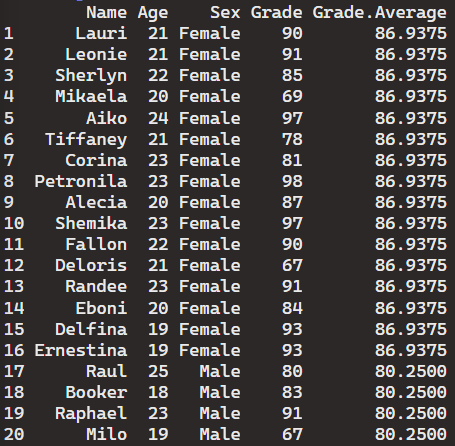
Then, I used the ddply() function to generate the “average.grade” and specify the functions parameters to also consider the “Sex” variable. I then proceeded to save the updated table as a new file.

Next, I proceeded to use the function subset() to create a table that only included names that had the letter “i”. Once again I saved the new table as a file using the function write.table().

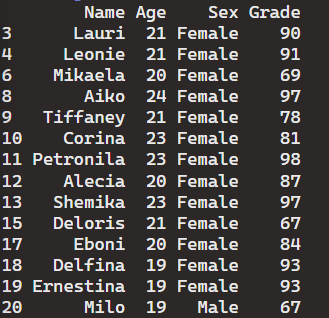
This assignment allowed me to practice how to manipulate text files in R as well as how to alter string characters within a table. Being able to display subsets of data is a huge advantage and allows the user to narrow down their data analysis.
GitHub Repository:
 Mack's Stats
Leave a comment