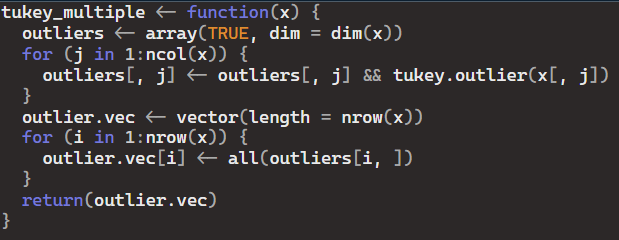
For this assignment we were asked to show our process of debugging the following code:
First, I created some sample data to test the function:

Next, I set a breakpoint at the beginning of the for loop by clicking in the left margin of the editor window next to the line where the loop starts.
Then, I ran the tukey_multiple function with our sample data and initiated the debugging:

Once I ran the function, the execution paused at the breakpoint. At this point, I used the debugging toolbar to step through the code line by line, inspecting variable values.
As I looked through the code, I noticed that the issue lied within the for loop where outliers[, j] was being updated. I expected this operation to be an element-wise comparison, but the && operator is used, which is incorrect.
To fix the issue, I modified this line to use the element-wise logical AND operator & instead of &&:

After making this change, I continued debugging to ensure that the function behaves as expected.
Once I was satisfied with the changes, I exited debugging mode by clicking the “Stop” button in the debugging toolbar.
 Mack's Stats
Leave a comment